Job management software for tradies that keeps the quote attached
A job in TradieTally starts as an accepted quote, so the price you agreed and the costs you estimated come with it. From there you schedule it, track it and see whether it actually made money.
- 21-day free trial
- No credit card required
- Cancel anytime
TradieTally is job management software for tradies in Australia, built by sparkies for the trade. It is an estimating system first, with purpose-built job management around it: every job starts from an accepted quote and is tracked against the original estimate, so you can see your numbers are pricing for profit. Jobs move from Draft to Invoiced, with budget vs actual, photos, notes and purchase orders on each one.
How does job management work in TradieTally?
As job management software for tradies, TradieTally is built to save you time and give you your evenings back. The whole workflow is streamlined, from the first site visit to a booked job, so there is no going back to the office to re-type anything.
And at every step the price comes from your real costs and target margin, so you are pricing for profit the whole way through.
- Build price bundles on site: create a new Smart Bundle for a job you will quote again, right there on your phone
- Quote on site: drop in your bundles, check the profit and send the quote before you leave the driveway
- Quote accepted: the customer accepts online and the labour, materials and pricing carry straight across
- Job booked: one click turns it into a job, the estimate becomes the job budget and it goes on the calendar
- Pricing for profit: time and costs are tracked against that budget, so you know the job made money
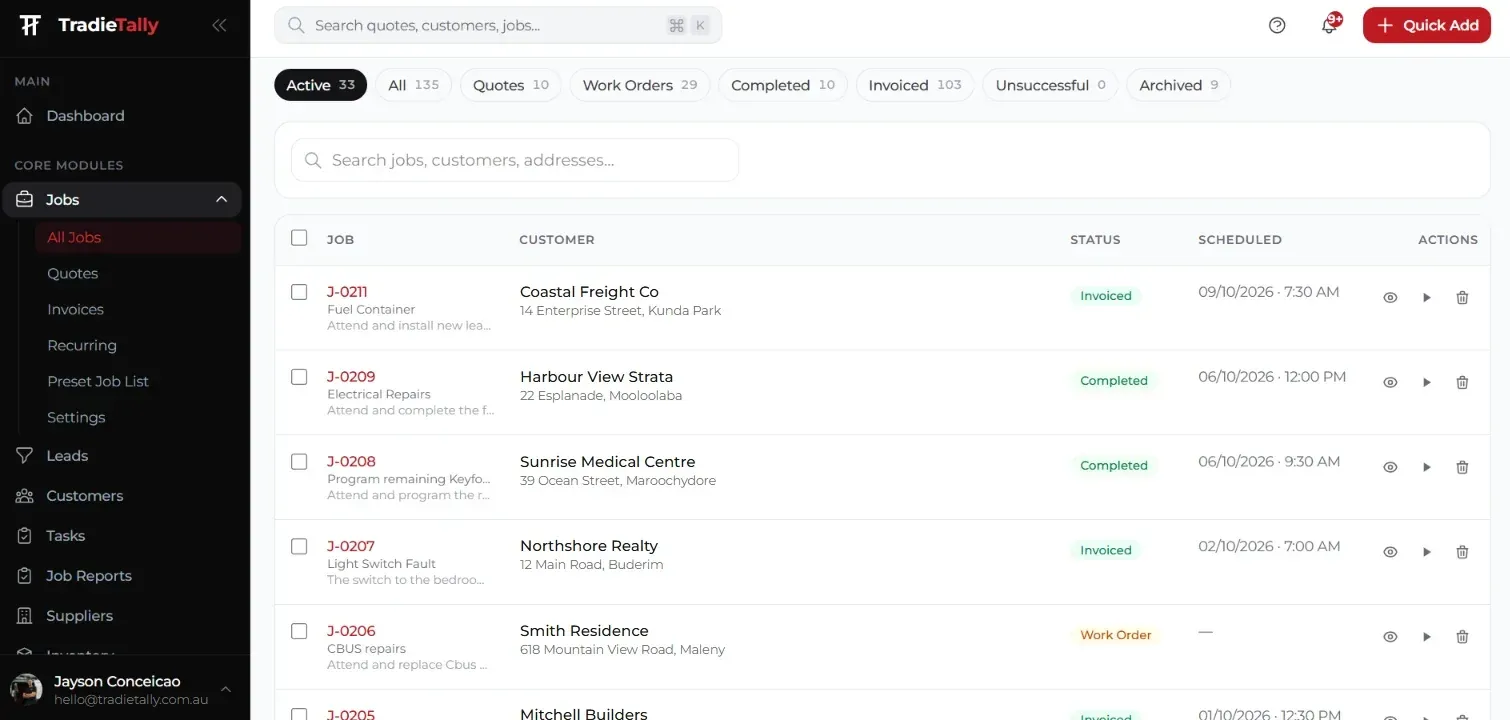
Once it is booked, every job moves through Draft, Scheduled, In Progress, Completed and Invoiced, so you can see at a glance what is waiting, what is on the go and what still needs an invoice.
How do I know if a job actually made money?
Each job shows budget vs actual. The estimate sets the budget, and the costs tracked on the job show the actual. If a switchboard upgrade blows out because the old board needed extra work, you see it on that job rather than finding out at tax time.
Across the business, the reports and dashboard show revenue vs expenses, active jobs and a profit and loss report, with CSV and Excel export.
What can I keep on a job record?
Everything to do with the job stays on the job: file attachments, site photos, notes and a full activity log of who did what. Purchase orders, tasks and assigned team members sit alongside.
Customers can have multiple site locations, which suits a security tech looking after several shops for one client, or an A/C business maintaining units across a strata complex. Leads are tracked too, so enquiries do not get lost before they become quotes.
- File attachments, photos and notes
- Activity log
- Purchase orders to suppliers
- Tasks and team assignment
- Leads and multi-site customer locations
How do stock re-orders and purchase orders work?
Inventory tracks what is in the warehouse and on each van, with the cost, sell price and margin on every item. Set a re-order level and TradieTally flags the item when stock runs low.
Hit re-order and the item drops onto a purchase order for your supplier, with GST worked out. Add delivery notes, save it as a draft or email it straight to the supplier.
Does TradieTally include job report templates?
Yes. Job Reports come with ready-made templates for each trade. Use one on a job as it is, or add it to your templates and change it to suit how you work.
- Electrical: switchboard condition report, switchboard inspection, pre-purchase inspection, test and tag, RCD test register, smoke alarm inspection, emergency lighting and electrical defects
- Security: CCTV condition report, alarm service, access control inspection, intercom inspection and security commissioning
- Air conditioning: split system service, ducted AC inspection, preventative maintenance, fault diagnosis and AC commissioning
Each report is set out under your business branding and can be downloaded as a PDF for the customer.
Can TradieTally handle recurring service and maintenance work?
Yes. Recurring schedules let you set up repeat work once and have it come back around. A security business can book the annual service visit for every alarm customer, and an air conditioning business can schedule a split service and clean on a regular cycle.
Recurring jobs land on the calendar like any other job, so you can see them in the job scheduling and timesheets views and assign them to the right tech.
What makes TradieTally different?
TradieTally is built by sparkies for the trade. It is an estimating system first, with a purpose-built job management system around it, so every job is priced for profit before it is booked in, not checked after it is finished.
Most job management tools start at the job card and leave the pricing to you. In TradieTally the price comes from your real running costs, charge-out rate and target margin, and that estimate becomes the budget for the job. As the job runs, time, materials and purchase orders are tracked against it, so you can see whether your numbers are still pricing for profit. That is the core difference covered in our software comparisons.
- Estimating first: price every job from your real costs and target margin
- Purpose-built job management: the accepted quote becomes the job and its budget
- Pricing for profit: budget vs actual on every job, so you know it made money
- Built by sparkies: designed by tradies who have quoted at the kitchen table themselves
Trade-specific workflows are covered on the electrical job management, security job management and A/C job management pages, and you can see how a security tech runs a job on site on our walkthrough page.
Job management for your trade
Electrical estimating software
Switchboard upgrades, rewires, EV chargers and fit-outs priced from your real labour and material costs.
- LED downlight changeover
- Switchboard upgrade
- Double GPO add
Security installer quoting software
Quote CCTV, alarms, intercoms and access control on site, then manage installs and service visits.
- 4-camera CCTV install
- Alarm install
- Intercom install
Air conditioning quoting software
Split, ducted and multi-head installs plus service agreements, with true profit on every job.
- Split system back-to-back install
- Split system standard install
- Ducted zone add
Job management FAQs
What job statuses does TradieTally use?
Jobs move through Draft, Scheduled, In Progress, Completed and Invoiced. Each status shows where the job sits so you can see at a glance what still needs booking, finishing or billing.
Can I raise purchase orders against a job?
Yes. Purchase orders are part of TradieTally job management, so you can order materials for a job without leaving the system. Suppliers are kept in a database with categories and preferred suppliers.
Does TradieTally track jobs for customers with more than one site?
Yes. Customers can have multiple site locations, so you can keep each site separate under one customer record. This suits commercial security clients, property managers and strata A/C maintenance.
Can I attach site photos and plans to a job?
Yes. Each job holds file attachments, photos and notes, plus an activity log of what happened and when. On the Team plan, field staff can add photos, files and notes from their phone.
Stop quoting at the kitchen table.
Price every job from your real costs, see the profit before you hit send, and run the whole job from one app. Built by a sparky for electricians, security techs and A/C contractors.