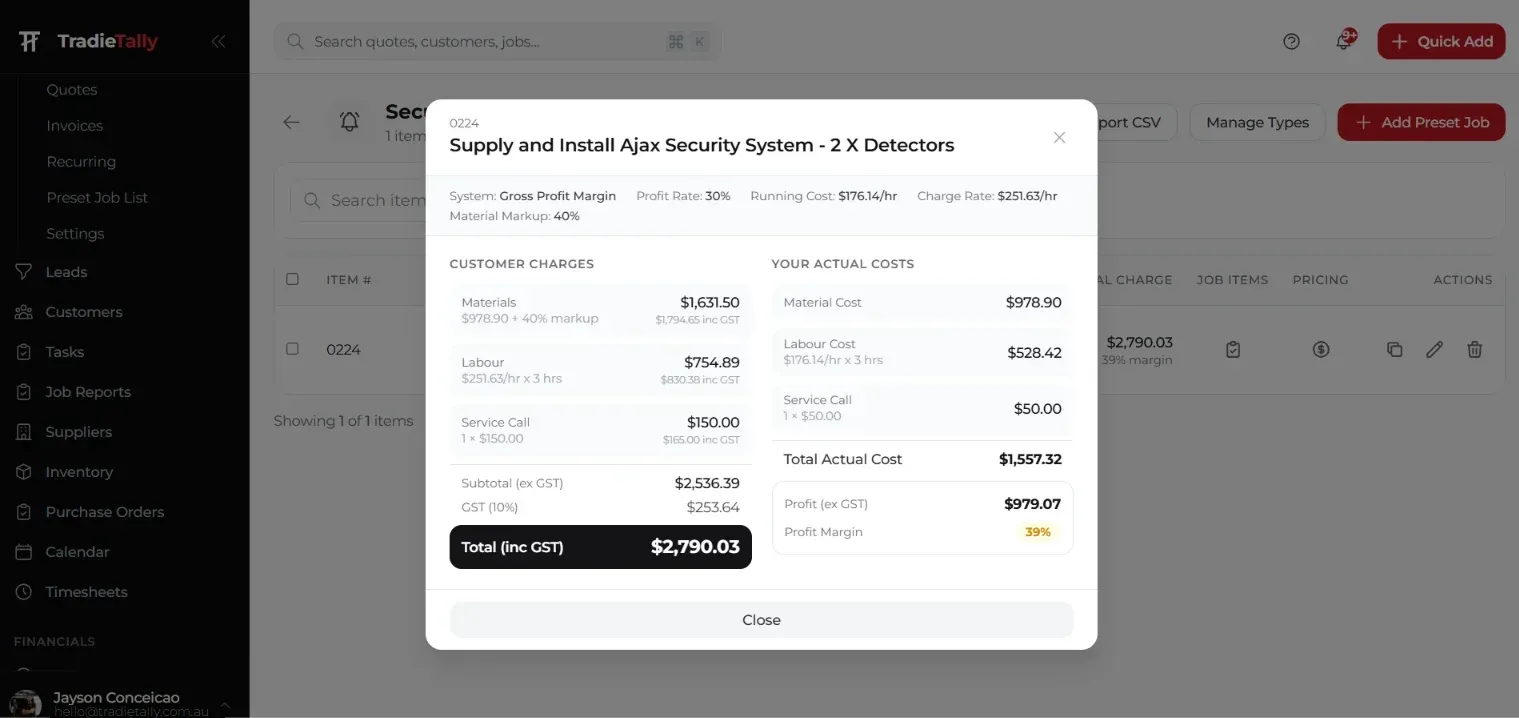
A CCTV quote that only lists “4 cameras, supply and install” leaves money on the table and invites the customer to compare you on price alone. A good quote shows the customer what they are getting, and shows you exactly where your profit is. I quote CCTV in my own security business every week, and this is the process I follow.
What should you check on a CCTV site survey?
Walk the site with the customer before you price anything. Use a checklist so you do not forget the things that blow out labour.
- What the customer wants to see: entries, driveway, side gates, rear yard, garage, shopfront, register
- Detail level needed: general overview, face identification at the door, or number plates on the driveway
- Mounting surfaces: brick, rendered block, weatherboard, eaves, metal fascia
- Cable path: roof space access, roof pitch and insulation, wall cavities, any slab or underground runs
- NVR location: somewhere secure, ventilated, with power and a network connection to the router
- Power: available GPO near the NVR; anything needing new circuits must go to a licensed electrician
- Lighting at night: whether cameras need strong IR or colour night vision
- Access: ladder heights, two-storey work, anything needing an elevated work platform
- Privacy: cameras should not look into neighbours’ yards or windows, and surveillance laws vary by state, so set camera angles with that in mind
Take photos of every proposed camera position and the NVR location. They go straight into the job file.
How many cameras does the job need, and where?
Start from the customer’s goals, not a package size. Most residential jobs land on four cameras: front entry, driveway, side or rear access, and back yard. Small commercial sites add the register, stockroom and rear door.
For each position note:
- What it needs to cover and from how far away
- The lens type (fixed wide, or varifocal for longer shots like plates)
- The mounting method and any bracket or junction box
- The cable route back to the NVR and the estimated length
How do you size the NVR and storage?
Pick the NVR
Choose an NVR with more channels than today’s camera count so the customer can add cameras later. For a four-camera job, an 8-channel PoE NVR is a common choice. Check the NVR’s total PoE power budget against the combined draw of all cameras, especially if you are using cameras with heaters or strong IR.
Calculate the storage
Storage per camera (GB) = bitrate (Mbps) × 3,600 × hours recorded per day × days of retention ÷ 8 ÷ 1,000
- × 3,600 turns seconds into hours
- ÷ 8 converts megabits to megabytes
- ÷ 1,000 converts megabytes to gigabytes
Example: four cameras each streaming at an example bitrate of 4 Mbps, recording 24 hours a day, keeping 30 days.
| Step | Calculation | Result |
|---|---|---|
| Per camera, per hour | 4 × 3,600 ÷ 8 ÷ 1,000 | 1.8 GB |
| Per camera, per day | 1.8 × 24 | 43.2 GB |
| Per camera, 30 days | 43.2 × 30 | 1,296 GB |
| Four cameras | 1,296 × 4 | 5,184 GB (about 5.2 TB) |
That is a 6 TB surveillance drive with a little headroom. Real bitrate depends on resolution, compression, frame rate and how busy the scene is, so check the manufacturer’s storage calculator for the exact cameras. Motion-only recording reduces storage, but most customers want continuous footage for the times motion detection misses.
What cabling and PoE do you need to price?
- Cable: Cat6 for each camera home run. Measure every run and add a sensible allowance for drops and termination.
- Distance limit: Ethernet and PoE are rated to 100 m per channel. Beyond that, quote an extender, switch or fibre.
- Termination: RJ45 connectors, boots and a tester.
- Weatherproofing: junction boxes or back boxes at each camera, grommets and sealant.
- Conduit: anywhere cable is exposed outside or on walls.
How do you estimate labour for a CCTV installation?
Break labour into parts instead of guessing a lump sum:
- Running and terminating each cable (single-storey roof space is quick; two-storey, flat roofs or concrete are not)
- Mounting and aligning each camera
- Installing and setting up the NVR and drive
- Commissioning: network, recording schedules, motion zones, remote app setup and handover
Price labour from your own charge-out rate, not a number you heard on a forum. The TradieTally charge-out rate calculator works it out from your real running costs.
Example CCTV installation quote (4 cameras)
All prices below are example sell prices only in AUD ex GST, for a single-storey home with easy roof access. Your prices will differ.
| Item | Qty | Unit price | Line total |
|---|---|---|---|
| 4MP turret camera, IR, PoE | 4 | $220.00 | $880.00 |
| 8-channel PoE NVR | 1 | $450.00 | $450.00 |
| 6 TB surveillance hard drive | 1 | $260.00 | $260.00 |
| Cat6 cable (metres) | 120 | $1.20 | $144.00 |
| Junction boxes, RJ45, conduit and fixings (lot) | 1 | $180.00 | $180.00 |
| Installation labour (hours) | 10 | $130.00 | $1,300.00 |
| Commissioning, app setup and handover (hours) | 1.5 | $130.00 | $195.00 |
| Subtotal ex GST | $3,409.00 | ||
| GST (10%) | $340.90 | ||
| Total inc GST | $3,749.90 |
Check: $880 + $450 + $260 + $144 + $180 + $1,300 + $195 = $3,409.00.
How much margin should you build into a CCTV quote?
Work out your target gross margin for the business, then check every quote against it before it goes out. Remember that a 30% markup on cost is only a 23.08% margin. If that catches you out, our explainer on markup vs margin for tradies has a conversion table.
Hardware is easy for customers to price online, so most of your margin should sit in labour, commissioning and the service you provide after the install.
What should a CCTV quote include?
- Your business name, ABN and licence number where your state requires it
- Customer and site address
- A short scope: camera positions and what each one covers
- Itemised equipment with model numbers
- Labour and commissioning as separate lines
- Storage and retention (for example, “approximately 30 days continuous recording”)
- Exclusions: new power circuits, two-storey access equipment, patching and painting
- Warranty terms for equipment and workmanship
- Quote validity period and payment terms
- An optional annual service visit
How do you upsell an annual service visit?
An annual service is the easiest recurring work in security. Offer it as an optional line on every CCTV quote: clean lenses and housings, check focus and angles, confirm recording and retention, check drive health, update firmware and test the app. Customers who say yes give you a booked job every year without quoting from scratch.
How TradieTally speeds up CCTV quoting
TradieTally’s Smart Bundles are pre-built job packages you can drop into a quote on site. The security technician set includes a 4-camera CCTV bundle, plus Alarm install, Intercom, Access control door and Annual service visit. Adjust the camera count or cable metres, and the quote shows your profit and margin before you send it.
See how the security technician quoting software and security estimating software fit together, or see the 4-camera CCTV bundle on site on our landing page.
Key takeaways
- Survey the site first and photograph every camera position and the NVR spot.
- Size storage with bitrate × 3,600 × hours × days ÷ 8 ÷ 1,000, per camera, then add headroom.
- Stay within 100 m per PoE run, or quote extra hardware.
- Itemise equipment, labour and commissioning separately, and list exclusions.
- Check margin, not markup, and offer an annual service visit on every quote.
Quote your next CCTV job on site instead of at the kitchen table. Compare TradieTally plans on the pricing page or start a 21-day free trial with no credit card.