“I put 30% on everything” is one of the most common things you hear from tradies about pricing. The problem is that 30% on cost is not 30% profit on the job. This guide sets out the two formulas, gives you a conversion table you can stick on the wall, and runs through real-world examples.
What is the difference between markup and margin?
Markup is the profit expressed as a percentage of cost. Margin (gross margin) is the profit expressed as a percentage of the selling price. Same dollars of profit, two different percentages, because they are divided by different numbers.
| Markup | Margin | |
|---|---|---|
| Measures profit against | Your cost | The selling price |
| Formula | (Price − Cost) ÷ Cost | (Price − Cost) ÷ Price |
| Price from cost | Cost × (1 + markup) | Cost ÷ (1 − margin) |
| Can it exceed 100%? | Yes | No |
| What your accountant reports | Rarely | Gross margin on your P&L |
What are the markup and margin formulas?
Use ex-GST figures for all of these.
- Profit = Price − Cost
- Markup % = Profit ÷ Cost × 100
- Margin % = Profit ÷ Price × 100
- Convert markup to margin: margin = markup ÷ (1 + markup)
- Convert margin to markup: markup = margin ÷ (1 − margin)
Quick check: a $1,000 cost sold for $1,500. Profit is $500. Markup is $500 ÷ $1,000 = 50%. Margin is $500 ÷ $1,500 = 33.33%.
Markup vs margin conversion table
Use this as a quick markup vs margin calculator. Figures are rounded to two decimal places.
Markup to margin
| Markup on cost | Gross margin you actually get |
|---|---|
| 10% | 9.09% |
| 15% | 13.04% |
| 20% | 16.67% |
| 25% | 20.00% |
| 30% | 23.08% |
| 40% | 28.57% |
| 50% | 33.33% |
| 60% | 37.50% |
| 75% | 42.86% |
| 100% | 50.00% |
Margin to markup
| Target gross margin | Markup needed on cost | Divide cost by |
|---|---|---|
| 10% | 11.11% | 0.90 |
| 20% | 25.00% | 0.80 |
| 25% | 33.33% | 0.75 |
| 30% | 42.86% | 0.70 |
| 35% | 53.85% | 0.65 |
| 40% | 66.67% | 0.60 |
| 50% | 100.00% | 0.50 |
The last column is the shortcut. To hit a target margin, divide your cost by (1 − margin). For 30%, divide by 0.7.
Worked examples for electrical, security and A/C jobs
The jobs below use example costs only, all ex GST. “Cost” means everything the job costs you: materials at your buy price plus labour at your hourly cost (not your charge-out rate).
Example 1: switchboard upgrade (electrical)
Job cost: $2,000. Target: 30% gross margin.
| Method | Calculation | Price | Profit | Real margin |
|---|---|---|---|---|
| 30% markup | $2,000 × 1.3 | $2,600.00 | $600.00 | 23.08% |
| 30% margin | $2,000 ÷ 0.7 | $2,857.14 | $857.14 | 30.00% |
Difference: $257.14 on one job.
Example 2: four-camera CCTV install (security)
Job cost: $2,400. Target: 35% gross margin.
| Method | Calculation | Price | Profit | Real margin |
|---|---|---|---|---|
| 35% markup | $2,400 × 1.35 | $3,240.00 | $840.00 | 25.93% |
| 35% margin | $2,400 ÷ 0.65 | $3,692.31 | $1,292.31 | 35.00% |
Difference: $452.31. If you are pricing CCTV regularly, our guide on how to quote a CCTV installation walks through the full job.
Example 3: split system install (air conditioning)
Job cost: $2,250. Target: 25% gross margin.
| Method | Calculation | Price | Profit | Real margin |
|---|---|---|---|---|
| 25% markup | $2,250 × 1.25 | $2,812.50 | $562.50 | 20.00% |
| 25% margin | $2,250 ÷ 0.75 | $3,000.00 | $750.00 | 25.00% |
Difference: $187.50 per install. Over 100 installs a year that is $18,750.
Why does markup vs margin matter so much?
Your overheads are paid out of margin
Your gross margin is what pays for everything that is not in the job cost: the office, the accountant, quoting time, unbilled callbacks and your profit. If your budget says you need a 30% margin and you price with a 30% markup, you are short 6.92 percentage points on every dollar you sell.
Discounts eat margin faster than you expect
Knock 10% off a $2,857.14 quote and you drop $285.71, which comes entirely out of your $857.14 profit. Your margin falls from 30% to 22.22% ($571.43 ÷ $2,571.43). Know your margin before you agree to a discount.
The same logic applies to your hourly rate
Your charge-out rate should be built the same way: hourly cost divided by (1 − target margin). The charge-out rate calculator does this for you from your real running costs.
How do you choose a target margin?
There is no single right margin for every trade business. Your target depends on your overheads, the type of work and how much risk sits in each job. Work it out from your own numbers:
- Add up a year of overheads that are not in your job costs (office, admin wages, insurance, software, vehicles not charged to jobs, accountant).
- Add the net profit you want the business to make on top.
- Estimate your yearly sales.
- Target margin = (overheads + target profit) ÷ yearly sales.
Example only: $120,000 overheads plus $60,000 target profit on $600,000 of sales. ($120,000 + $60,000) ÷ $600,000 = 30%. That business needs an average gross margin of 30% across every job, which means pricing at cost ÷ 0.7, not cost × 1.3.
Different work can carry different margins. Small service calls and after-hours work usually justify a higher margin than a large, repeat install where the risk is lower. The point is to know what the average needs to be and check every quote against it.
What are the most common markup and margin mistakes?
Using your charge-out rate as “cost”
If your labour cost on the quote is already at your charge-out rate, it already includes profit. Adding a margin on top double-counts, which can price you out of work. Use your hourly cost for labour when you calculate job margin, or exclude labour from the markup.
Forgetting the hidden costs on materials
Your buy price is not the full cost of materials. Picking up from the wholesaler, returns, offcuts, damaged stock and warranty callbacks all cost time and money. A materials markup that only covers the invoice price leaves those costs unpaid.
Quoting from memory
“I usually charge about $X for one of those” is a markup in disguise. Prices you set two years ago probably do not reflect today’s material and labour costs. Re-check your common jobs at least once a year.
Mixing ex-GST and inc-GST figures
Working out margin on a GST-inclusive price makes your margin look better than it is. Keep costs and prices ex GST, then add GST at the end.
How does TradieTally handle markup and margin?
TradieTally lets you price with markup or margin on every line item, and shows the job’s real profit and margin before you hit send. For example, an intercom replacement job charged at $1,783.92 inc GST shows $1,064.56 in costs, $557.18 profit and a 34% margin, all visible before the quote goes out.
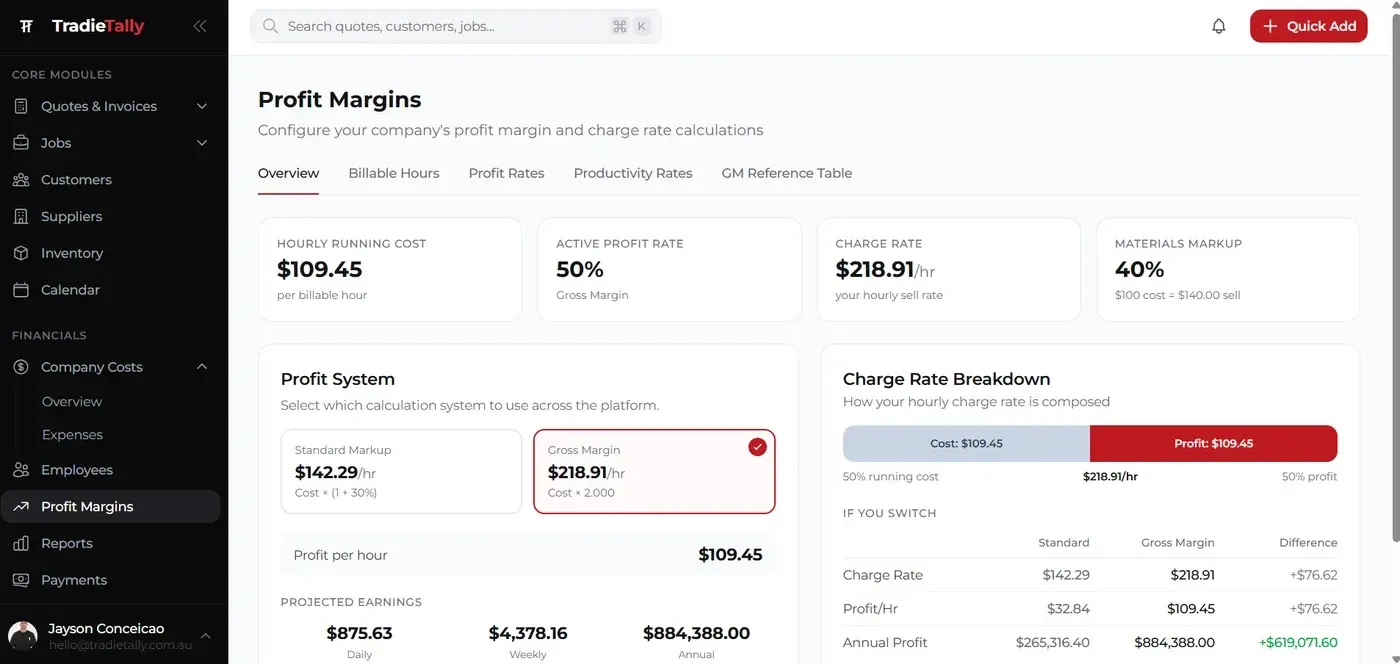
The TradieTally charge-out rate calculator also compares margin and markup side by side. In its example, a running cost of $109.45/hr at a 50% gross margin gives a charge rate of $218.91/hr, and the comparison shows $76.62 more profit every hour by using margin instead of markup. Margin warnings flag jobs where costs push you under your target.
If you want those numbers built into every quote, see how our quoting software and estimating software work together. You can also see what TradieTally looks like for electricians, security techs and A/C installers on our landing page.
Key takeaways
- Markup is profit ÷ cost. Margin is profit ÷ price.
- Margin = markup ÷ (1 + markup). Markup = margin ÷ (1 − margin).
- A 30% markup is only a 23.08% margin. A 30% margin needs a 42.86% markup.
- To hit a target margin, divide cost by (1 − margin).
- Always work on ex-GST figures, and check job margin before offering a discount.
Stop guessing whether a job is worth doing. TradieTally shows profit and margin on every quote before you send it. Compare plans on the pricing page or start your 21-day free trial, no credit card needed.